Explore AI
What can your machine run?
Find the hardware you already own. Each tier says what fits, what does not, and what it will feel like.
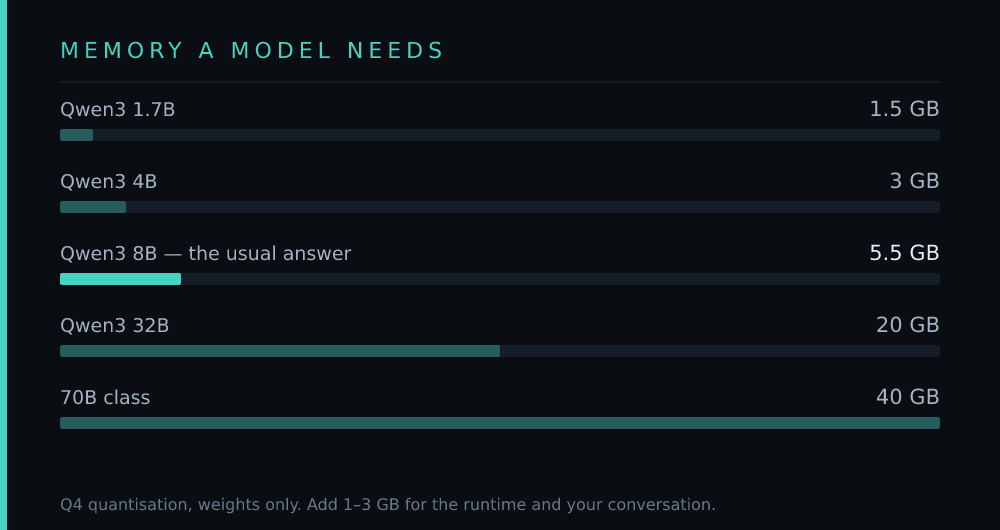
The single most common question about local AI is "can my computer run this?" — and the answer is arithmetic, not opinion.
The arithmetic
A model's memory footprint is roughly:
weights = parameters × bytes per weight (at Q4, about 0.55 bytes per parameter) > > plus the KV cache — the model's working memory of your conversation, which grows with context length and can add several gigabytes > > plus overhead for the runtime itself
So an 8B model at Q4 is about 5.5 GB of weights. Add context and overhead and you want 8 GB free to be comfortable. A 32B model is about 20 GB, so you want 24 GB.
That is the whole trick. Everything below follows from it.
Pick your machine
The tiers below are shortcuts. Each one lists what genuinely fits — not what fits if you close every other application and accept a two-minute wait.
A warning about "it runs"
Plenty of guides will tell you a model "runs" on your hardware. What they usually mean is that it loads and produces tokens. That is not the same as being usable:
- Below about 5 tokens per second, conversation feels broken. You are reading slower than you think.
- Quantised below Q4, quality drops in ways that benchmarks do not show.
- Offloading to system RAM makes a model fit, at a speed that usually makes it pointless.
The tiers here set a higher bar: they list what you can use without resenting it.
If nothing here fits
That is a real answer, and covered honestly in the last tier. Renting a GPU by the hour, or using a hosted model, is not a failure — for most people it is the correct engineering decision.